How to Choose Between LED and LCD Displays for Your Business?
In today’s competitive landscape, choosing the right display technology for your business is critical. The LED LCD industry expert, Dr. Susan Mitchell, once stated, "Businesses must consider long-term costs and benefits when selecting display technology." Her insight highlights the importance of careful deliberation.
LED and LCD displays offer distinct advantages that can impact your operations. LED displays are known for their vibrant colors and energy efficiency. However, they can come with a higher initial investment. In contrast, LCDs are often more affordable and can suit various environments. Yet, they may not deliver the same brightness levels and color accuracy as their LED counterparts.
Reflecting on these choices can be overwhelming. Businesses might find themselves drawn to the allure of high-end technologies without fully understanding their implications. It is vital to analyze your specific needs, budget constraints, and installation requirements. The journey to selecting the right "LED LCD" solution is not just about following trends; it is about making informed decisions that align with your goals.

Understanding the Fundamental Differences Between LED and LCD Displays
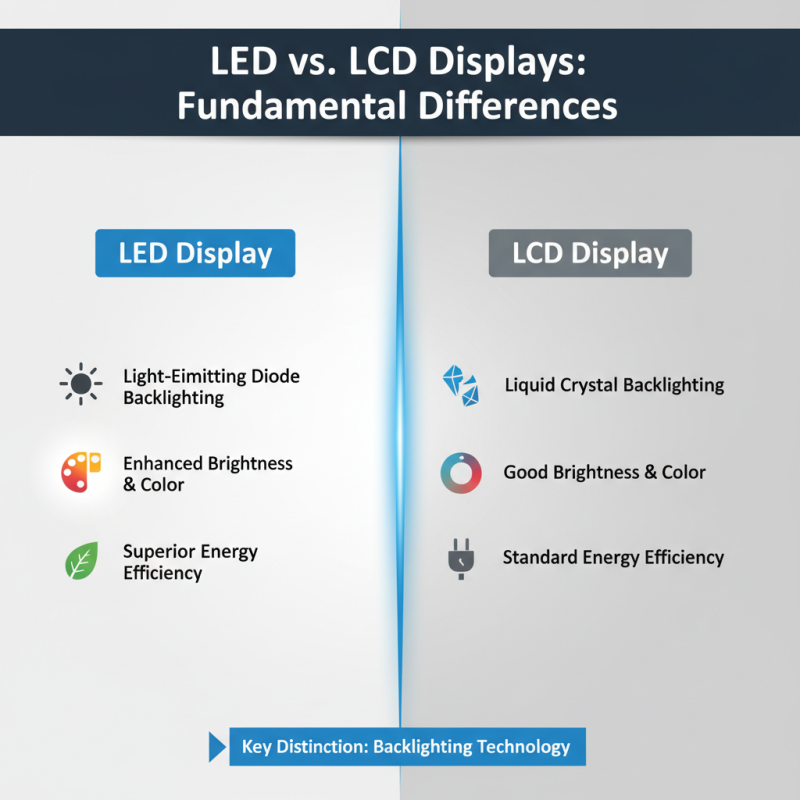
When deciding between LED and LCD displays, understanding their fundamental differences is crucial. LED displays use light-emitting diodes for backlighting, while LCD displays rely on liquid crystals. This basic distinction impacts brightness, color vibrancy, and energy efficiency.
LED displays typically offer superior brightness levels, often exceeding 1000 nits. In comparison, LCD displays usually peak at around 300 to 500 nits. A report from the International Display Corporation highlights that businesses seeking outdoor displays should lean towards LED technology, given its better visibility in varying lighting conditions. Additionally, LED displays have a wider color gamut. They can reproduce deeper blacks and more vivid colors, which enhances visual experiences, especially for media presentations.
However, LED technology comes with its own set of challenges. The initial cost of LED displays can be higher, potentially straining budgets. Moreover, heat management is critical. Overheating can lead to display failures, affecting business operations. In contrast, LCD displays might be more affordable and offer suitable quality for less demanding environments. Understanding these pros and cons can guide businesses in making informed decisions for their display needs.
Evaluating Brightness and Color Accuracy for Business Applications
When choosing between LED and LCD displays for business applications, brightness and color accuracy are critical factors. Studies indicate that LED displays often outperform LCDs in terms of brightness. For example, a report by the International Display Research concludes that LED screens can achieve brightness levels exceeding 1,000 nits. This is advantageous in environments with high ambient light, such as retail stores or conference rooms.
Color accuracy also plays a significant role in display selection. A source from the Society for Information Display indicates that LED displays can cover up to 90% of the Adobe RGB color space, ensuring vibrant and true-to-life colors. In contrast, some LCD displays struggle to reach this level. However, one must consider the potential downsides. LED displays can suffer from color uniformity issues, while LCDs often provide more consistent color across the screen. This can impact presentations and visual content.
Businesses should evaluate their specific needs. If brightness is a priority, LED might be the better choice. For applications requiring consistent color quality and precision, LCDs may be preferable. Recognizing these subtleties can guide informed decisions in display technology, shaping effective visual environments for various business contexts.
Assessing Energy Efficiency and Long-Term Cost Implications
When deciding between LED and LCD displays for your business, energy efficiency is a crucial factor.
LED displays consume about 30% less energy compared to traditional LCD displays.
This significant reduction can lead to lower electricity bills over time.
According to the U.S. Department of Energy, adopting LED technology in commercial settings can save businesses up to
$1.9 billion in energy costs annually.
Long-term cost implications also play a vital role.
LED displays typically have a longer lifespan, averaging around 50,000 hours.
In contrast, LCD displays last about 30,000 hours.
This longevity means fewer replacements and potentially lower maintenance costs for businesses.
However, upfront costs for LED displays can be higher.
It's worth weighing initial investment against future savings.
Although LED technology is becoming more popular, there are challenges.
Not all LED displays are created equal.
Some may have uneven brightness or color inconsistencies.
These issues can affect the viewing experience.
It's essential to conduct thorough research before making a purchase.
Understanding energy ratings and performance standards can help in making an informed decision.
Balancing cost, efficiency, and quality is key to optimizing your investment.
Analyzing Durability and Lifespan of LED vs LCD Displays
When considering displays for your business, durability and lifespan are key factors. LED displays generally outlast LCD screens. They can operate for over over 50,000 hours, while LCDs often last around 30,000 hours. This difference significantly impacts maintenance costs and replacement schedules for businesses.
LED technology is often more resilient to temperature variations and physical stress. This resilience makes them suitable for high-traffic areas. Meanwhile, LCD screens may suffer from screen burn-in over time. This can affect visual quality and require earlier replacements, leading to unexpected expenses.
Tips for durability:
- Choose displays based on your specific environment.
- Regularly clean screens to maintain clarity and performance.
- Consider using protective casing for LCDs in busy settings.
Investing in
LED might seem steep initially, but their long-term benefits can outweigh costs. Reflect on your business's display needs to make an informed choice.
Exploring User Experience: Visual Comfort and Viewing Angles
When choosing between LED and LCD displays, user experience is vital. Visual comfort is a primary concern. LED displays usually offer brighter images. This can be beneficial in well-lit environments. However, too much brightness can lead to eye strain. Users may experience discomfort during prolonged viewing. It's essential to find a balance that suits your specific needs.
Viewing angles also play a critical role. LED panels can maintain color integrity at wider angles. This advantage is significant for group presentations or collaborative workspaces. Conversely, standard LCD displays may lose color accuracy when viewed from the side. This can affect how content is perceived in teamwork settings. Test different displays to see how they perform at various angles.
Be mindful that not all users have the same preferences. Some might favor the rich contrasts of LED displays. Others might prefer the softer tones of LCDs. Individual comfort varies significantly. Regular feedback from your team can help gauge overall satisfaction. Understanding these nuances can lead to better display choices.
How to Choose Between LED and LCD Displays for Your Business?
| Display Type |
Visual Comfort |
Viewing Angles |
Energy Consumption |
Typical Applications |
| LED |
High brightness, less eye strain |
Wide viewing angles |
Low energy consumption |
Digital signage, control rooms |
| LCD |
Adequate brightness, may cause some eye strain |
Narrower viewing angles compared to LED |
Higher energy consumption |
Office workstations, educational environments |
| OLED |
Exceptional color accuracy, less eye fatigue |
Excellent viewing angles |
Varies; generally low |
High-end displays, premium signage |