What Is a Mini LED Display and How Does It Work?
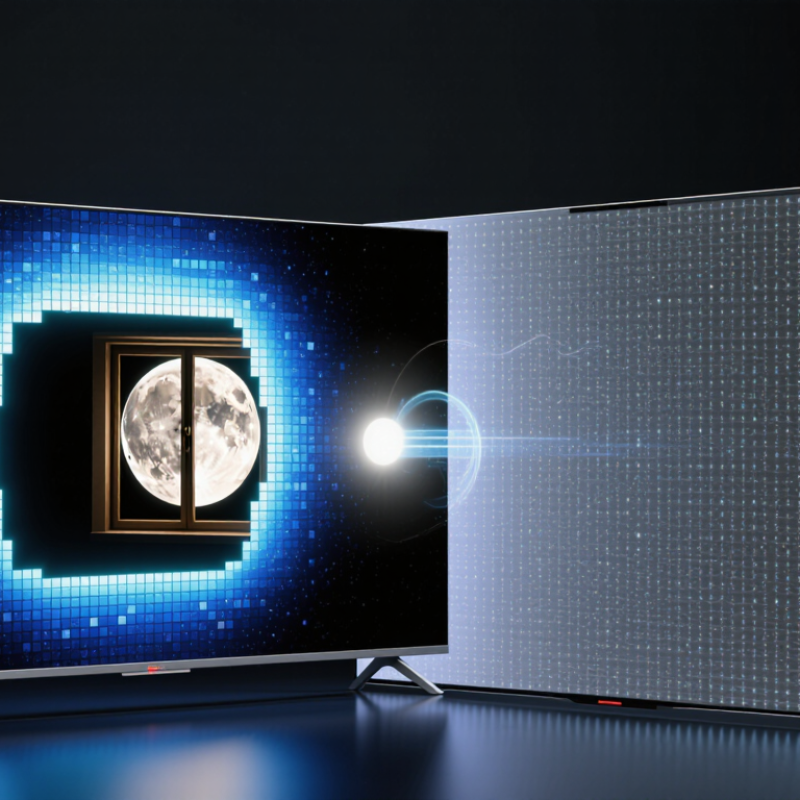
A mini LED display is changing how viewers understand brightness, contrast, and screen detail. Unlike a conventional LED television, it uses thousands of much smaller light-emitting diodes behind the LCD panel. These tiny LEDs form many local-dimming zones. The screen can brighten a moonlit window while keeping the surrounding sky nearly black. That contrast is the main attraction.
Ross Young, founder and CEO of Display Supply Chain Consultants, has described Mini LED as “a backlight technology, not a display technology.” This distinction matters. A mini LED display still depends on an LCD layer to create colors and images. The mini LEDs provide controlled illumination, while liquid crystals shape the final picture. More zones can reduce blooming around subtitles and bright objects. However, they cannot remove it completely. Real performance depends on panel design, processing software, zone count, and viewing conditions.
The technology also brings practical trade-offs. More LEDs can produce higher brightness for HDR films, games, and professional work. They can also increase power use, heat, and manufacturing complexity. A premium specification sheet may look impressive. It does not guarantee perfect uniformity. Dark scenes can reveal halos, uneven backlighting, or slow dimming transitions. I have found that these weaknesses are easiest to notice in a dark room, especially around white text.
This guide explains what a mini LED display is, how its backlight operates, and why local dimming matters. It also examines brightness, contrast, color accuracy, power consumption, and viewing experience. The technology is promising, but not magical. Careful comparison remains essential.
What Is a Mini LED Display?
A Mini LED display is usually an LCD panel with a much denser LED backlight. Its LEDs are far smaller than traditional backlight LEDs. They are grouped into hundreds or thousands of local-dimming zones. Each zone can brighten or darken independently. This improves contrast, HDR highlights, and shadow detail. It does not create light at every pixel. That is the key difference from Micro LED and OLED technology.
The working process is fairly practical. A liquid-crystal layer controls each pixel, while the Mini LED layer supplies adjustable light behind it. A control chip analyzes the image and changes zone brightness in real time. Bright headlights can appear beside darker streets. However, light leakage, called blooming, may still appear around subtitles or stars. The result depends on zone count, optical design, software, and viewing angle. More zones do not automatically mean a better picture.
TrendForce’s 2024 display analysis describes Mini LED backlights as a growing market measured in millions of units across televisions, monitors, notebooks, and tablets. Technical reports also commonly describe implementations using hundreds to several thousand LEDs. These figures vary by screen size and application, so simple comparisons can mislead.
Tips: Check local-dimming zone performance, not only the LED count. Review dark-scene tests and brightness measurements. A very bright screen may consume more power. My practical concern is often overlooked: blooming can remain visible in a dark room, even on expensive panels.
How Mini LED Backlighting Is Built
A Mini LED display begins with a dense backlight, not with smaller pixels. Hundreds or thousands of tiny light-emitting diodes sit on a circuit board behind the LCD panel. Their small size allows engineers to arrange more lighting zones within the same area. Each zone can brighten or dim independently.
The build usually includes LED packages, driver circuits, a diffuser plate, and optical films. The driver controls current and timing for each zone. The diffuser spreads concentrated light across the panel, while the films guide it toward the viewer.
The LCD layer then regulates individual pixels, shaping the final colors and brightness. A dark scene with a bright window shows the system clearly. The window zone stays bright, while nearby zones reduce their output.
This process is precise, but not flawless. Light can spill around bright objects, creating a faint halo on dark backgrounds. Zone size, panel structure, calibration, and viewing angle all affect that result. Heat also matters. Dense LEDs need careful thermal management to maintain stable brightness over time. During display testing, engineers measure luminance, black levels, color accuracy, and transition behavior. These checks reveal problems that marketing descriptions often overlook. Mini LED improves backlight control substantially, yet it does not provide pixel-level lighting. That distinction remains important.
How Mini LED Displays Produce Images
A Mini LED display creates images through a dense backlight positioned behind an LCD panel. Its LEDs are much smaller than those in traditional displays. This allows manufacturers to place more light sources across the screen.
The process begins with an image signal. A display processor analyzes brightness in different areas. It then adjusts groups of Mini LEDs called local dimming zones. Bright zones receive more power, while darker zones receive less. The LCD layer controls each pixel’s red, green, and blue light. Together, the backlight and LCD create the final picture.
Watch the bright moon.
In a night scene, the moon can appear intensely bright while nearby areas remain almost black. This stronger contrast improves depth and makes highlights look more realistic. Mini LED displays can also deliver high brightness for daylight viewing and detailed HDR content. However, the result depends on zone density, software control, and panel quality. A dark object beside a bright object may still produce a faint halo. This happens when one dimming zone covers both areas.
Mini LED is not a self-emissive technology.
The backlight remains active behind the LCD, even when individual pixels appear black. That design can reduce perfect black performance compared with pixel-level lighting systems. Still, it offers a practical balance between brightness, contrast, and screen size. In real viewing, fast scenes may reveal uneven dimming or delayed brightness changes. These issues are easy to miss in store demonstrations. Careful testing with subtitles, star fields, and shadow detail often gives a more honest impression.
Key Benefits and Limitations of Mini LED Technology
Mini LED displays use thousands of tiny backlights behind an LCD panel. Each light is much smaller than a conventional LED. A control system dims groups of lights, called local dimming zones. Bright areas can glow strongly while dark areas stay relatively deep. This design can produce higher contrast, stronger highlights, and better HDR detail. It also supports high brightness in rooms with sunlight. In practical viewing, bright text remains clear near a window.
The limitations deserve equal attention. A display may show blooming when bright objects sit beside black backgrounds. Dark subtitles can reveal faint halos. More dimming zones help, but they do not remove the issue. Mini LED also needs complex thermal and power management. High brightness can increase energy use and surface heat. Viewing angles may still depend on the LCD layer, not the backlight. Results vary greatly. Calibration matters, too. Factory settings can look vivid but inaccurate. Buyer expectations can become unrealistic.
Tips: Check local dimming performance in a dark room. Watch star fields, subtitles, and white text on black backgrounds. Compare several brightness levels, not only the brightest mode. Ask whether firmware updates improve dimming behavior. A good Mini LED display should balance impact, comfort, and accuracy. Personally, I would value controlled highlights over extreme brightness. More light is not always better.
What Is a Mini LED Display and How Does It Work?
Mini LED displays use much smaller LEDs in the backlight than conventional LED displays. This allows more independently controlled local-dimming zones, improving contrast and HDR brightness while still using an LCD panel.
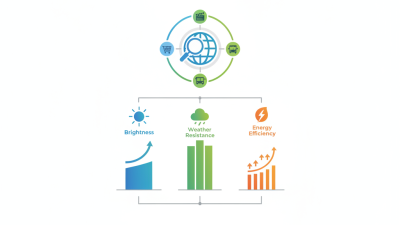
How to read the chart: More dimming zones generally provide finer control over bright and dark areas. Mini LED can deliver higher brightness, better contrast, and improved HDR performance than conventional LED backlights. However, it remains a backlit LCD technology, so blooming around bright objects and less-perfect blacks can still occur. Actual zone counts vary by screen size and panel design.