In 2026, the best digital screen for a business depends less on a single “top” model than on how people will use it. A bright storefront display faces different demands from a meeting-room screen or a menu board. Sunlight, viewing distance, daily operating hours, and available space all affect what works. Small details matter.
A useful comparison should look beyond resolution and screen size. Check brightness, connectivity, content-management tools, warranty terms, and expected energy use. Ask how easily staff can update content, and whether the display remains readable from the places customers actually stand. A specification sheet cannot answer every question. A practical test helps.
This guide considers the features that shape a dependable purchase, from installation and ongoing support to long-term operating costs. It also separates genuine business needs from features that may sound impressive but add little value. Requirements vary by industry, budget, and location, so no recommendation fits every company. Even a careful shortlist can miss something. Comparing realistic use cases—and confirming details with manufacturers or qualified installers—can help buyers choose a digital screen with greater confidence in 2026.
What Defines a Business Digital Screen in 2026?
A business digital screen is more than a bright panel on a wall. It combines a display, a content system, and a reliable way to update information. In a reception area, that might mean showing visitor instructions beside a meeting-room schedule. In a shop, it could mean displaying current prices that staff can check before opening. The screen should fit its viewing distance, ambient light, and daily operating hours. That matters. A screen that looks sharp in a quiet office may be hard to read beside a sunlit window.
In 2026, the definition also includes how content is managed and verified. Staff need clear permissions, dependable scheduling, and a simple fallback when the network drops. Readable text, useful contrast, and captions make information easier to access. Basic performance checks can reveal whether screens are running and content is current, though those checks cannot prove that a message helped customers. A polished dashboard is not the whole story. The practical test is whether people can understand the message quickly and whether employees can correct an error without calling a specialist. Some details will still be missed; placement and real-world testing deserve more attention than many teams expect.
A business screen should solve a specific communication problem, not simply look impressive. Start with the job. A reception display must stay readable in daylight and show changing information clearly. A meeting-room screen needs comfortable viewing from the back row, reliable connections, and enough space for shared documents. For retail or operations, consider viewing distance, ambient light, content updates, and whether people need to touch the display. These details shape screen size, brightness, resolution, and interactive features. A common mistake is buying for peak specifications before measuring the room.
Accessibility matters, too. The World Health Organization’s 2019 World Report on Vision estimates that at least 2.2 billion people worldwide have near or distance vision impairment. Clear text, strong contrast, and sensible viewing distances help more people use screen content. For installation planning, AVIXA’s 2024 Industry Outlook projected global professional audiovisual revenue would reach $325 billion by 2028, reflecting the growing range of workplace display applications. But a larger market does not make every feature useful. Match the screen to daily tasks, operating hours, content-management capacity, and available support. Then check the actual room: glare on a sample screen can be surprising, and specifications alone may not reveal it.
| Business Need | Suitable Screen Type | Why It Fits | Key Selection Checks | Potential Limitations |
|---|---|---|---|---|
| Menus, promotions, and information in shops or restaurants | Commercial LCD display | LCD screens can show full-colour images, video, and frequently updated content. They are available in a range of sizes and are commonly used for indoor signage. | Check operating-hours rating, screen size, resolution, portrait or landscape orientation, connectivity, and compatibility with the intended content-management system. | Glare and reflections can reduce readability in bright locations. A standard indoor display may not be designed for direct sunlight or outdoor exposure. |
| Large-format visuals for events, lobbies, or venues | Direct-view LED display | LED display panels can be assembled into large or custom-shaped video walls. They are useful when a seamless large image is more important than a single-screen format. | Compare pixel pitch with the closest typical viewing distance, check installation and service access, and confirm power, mounting, and content-resolution requirements. | Costs, installation complexity, and energy use vary with display size, pixel pitch, brightness, and operating conditions. Close viewing can reveal individual pixels on a coarse-pitch display. |
| Outdoor advertising or information in daylight | Outdoor-rated LCD or LED signage | Purpose-built outdoor displays are designed for brighter environments and may include protection against weather and dust. | Review the manufacturer’s brightness rating in nits, sunlight readability, temperature range, ingress-protection rating, ventilation, and local mounting requirements. | Outdoor-rated equipment generally needs more careful installation and environmental protection than indoor screens. Brightness alone does not guarantee readability if the screen faces strong reflections. |
| Wayfinding, product exploration, or self-service | Touch-enabled LCD kiosk or interactive display | Touch interaction lets visitors navigate menus, maps, catalogues, or service workflows directly on screen. | Test touch responsiveness, screen height and reach, interface accessibility, cleaning requirements, network reliability, and the availability of a non-touch alternative where needed. | Interactive hardware requires suitable software and ongoing maintenance. Touchscreens may need frequent cleaning in high-traffic settings. |
| Static notices or schedules that change infrequently | Electronic paper display | Electronic paper reflects ambient light and can keep a displayed image without continuously refreshing it, making it suitable for certain low-update information tasks. | Check colour capability, update frequency, viewing conditions, connectivity, and whether the required content can be displayed at the screen’s resolution. | It is generally less suited to full-motion video, rapid animation, or frequent visual transitions than LCD or LED screens. |
| Presentations in meeting rooms or training spaces | Large-format LCD display or projector | A display provides a direct-view image; a projector can create a large image on a suitable projection surface. The right option depends on room layout and image size. | Assess audience size, viewing distance, ambient light, available wall or screen space, connection options, audio needs, and the projector’s throw distance if applicable. | Projector image visibility depends on ambient light and the projection surface. A large display may require more wall space and a suitable installation. |
| Consistent content across multiple locations | Networked commercial displays with a content-management system | Central management can help teams schedule, update, and monitor content across connected screens. | Confirm supported media formats, user permissions, scheduling, network requirements, offline behaviour, security controls, and any recurring software fees. | Central management depends on reliable connectivity and a well-defined publishing process. Check whether the system works with existing business devices and workflows. |
| Frequent use throughout long business hours | Commercial-grade display matched to the duty cycle | Commercial models may be specified for longer operating schedules than consumer televisions; suitability depends on the individual model’s documented rating. | Verify the stated operating-hours rating, warranty terms, cooling requirements, orientation support, and availability of replacement or service parts. | Do not assume every commercial display supports continuous operation. Compare the exact model specifications with the planned daily schedule. |
Selection principle: Start with the viewing environment, audience distance, content type, operating schedule, and installation constraints. Confirm brightness, durability, connectivity, and operating-hour claims in the specifications for the exact model under consideration.
Choosing a business screen starts with its viewing conditions, not just its resolution. A lobby display viewed from two metres away may work well at 4K with moderate brightness. A sunlit window needs far more brightness, often around 2,500 nits or higher, to remain readable. For outdoor locations, check weather protection and operating-temperature ratings, not brightness alone. IEC 60529 defines IP65 as dust-tight and protected against water jets. It does not certify impact resistance or performance in every climate. Screen size and pixel pitch matter too: viewers standing close notice coarse pixels quickly. There is no universal winner. The site survey is easy to rush, and that can be a costly mistake. Grand View Research estimated the global digital-signage market at USD 28.83 billion in 2024, with an 8.1% projected annual growth rate through 2030. That growth reflects varied uses, not one ideal specification.
Tips: Measure the brightest ambient light at the actual installation point. Compare screens using brightness, resolution, viewing angle, runtime rating, warranty, and power consumption. For a shop window, test legibility at midday from across the street; indoor showroom samples can mislead. Ask for measured brightness and the test conditions behind it. Match pixel pitch to viewing distance rather than automatically choosing the sharpest, most expensive panel. Also check whether the screen can run the required hours without reducing brightness. Small details matter. A bright screen may still wash out when glass reflections hit it at the wrong angle.
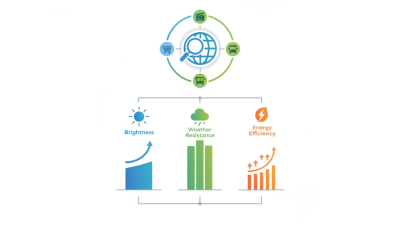
Typical peak brightness by digital screen type
Brightness is one factor in choosing a business display. These approximate representative values illustrate typical use cases; actual specifications vary by model. Indoor LCDs suit controlled lighting, high-brightness LCDs and outdoor LED are designed for brighter environments, while e-paper prioritizes low power use for static content.
A business screen’s performance depends on more than resolution. Match brightness to the room: a sunlit storefront needs more light than a dim meeting room, while excessive brightness wastes energy. Check viewing distance, glare, operating hours, connectivity, and whether the display can run continuously. EIA’s 2018 Commercial Buildings Energy Consumption Survey counted about 5.9 million U.S. commercial buildings. A small inefficiency can matter when screens run across many sites. Still, screen energy use varies; a single national average would be misleading.
Total cost includes purchase, electricity, mounting, content management, repairs, and replacement. For a clear estimate, calculate annual energy use:
a 500-watt screen running 16 hours daily consumes about 2,920 kWh yearly. At $0.15 per kWh, that is roughly $438, before cooling or service costs.
The U.S. Department of Energy’s Commercial Buildings Energy Consumption Survey offers useful context for building energy use, but local tariffs and actual screen settings matter more to a buyer’s bill. One weak spot in many budgets: installation and downtime are often left out.
Tips: Compare measured power at your intended brightness, not just the maximum rating. Ask for warranty terms, parts availability, and a realistic service estimate. Test glare at the actual viewing angle. Small detail, big difference.
Start with the task, viewing distance, and room conditions. A reception display may need large text and clear images from several metres away. A meeting-room screen should make small charts readable from the back row. Distance matters. For menus or notices, check that content stays legible under bright lighting and can be updated without awkward workarounds. A screen that looks impressive in a showroom may seem dim beside a sunlit window.
For each location, note the usual audience, daily operating hours, and available mounting space. Then compare brightness, resolution, screen size, connectivity, and expected maintenance needs. For interactive use, test touch response with the software and content employees will actually use. For simple announcements, those features may add cost without much value.
Ask staff to review a test setup; they often notice glare, awkward controls, or text that is too small. Test before buying. Specifications help, but they cannot fully predict how a screen will feel in a real room. I would still revisit the choice after a few weeks, because actual viewing habits can differ from the plan.