What Are the Top Types of Outdoor LCD Displays?
Outdoor LCD displays are built for places where sunlight, rain, dust, and heat challenge ordinary screens. Yet “outdoor” is not one design category. A sunlit storefront needs strong brightness and clear reflections. A transit shelter may need a sealed enclosure, reliable cooling, and dependable operation through changing weather. The right choice depends on the location, viewing distance, content, and maintenance plan.
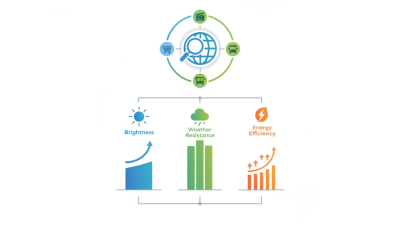
Outdoor-display engineer Lena Ortiz puts the trade-off simply: “Brightness gets attention; thermal control keeps the display working.” That principle helps explain why product types differ. High-brightness LCD displays suit direct or strong ambient light. Weatherproof digital signage adds protective housing for exposed installations. Sunlight-readable displays often combine brighter panels with optical treatments that reduce glare. Some installations also use touch screens, though touch performance can change when users wear gloves or the surface gets wet.
Small details matter. A screen behind glass may look washed out at noon. A dark enclosure can grow hot in afternoon sun. These are easy to overlook.
This guide compares the leading types of lcd display outdoor solutions, their typical strengths, and where each fits best. It also looks at brightness, ingress protection, cooling, panel orientation, and service access. Specifications deserve a close read, but they cannot replace site checks. Measure ambient light, inspect the mounting position, and consider how technicians will reach the unit. There is no perfect display for every setting. A sensible shortlist begins with the real conditions, not a headline specification.
What Makes an LCD Display Suitable for Outdoor Use?
An outdoor LCD display must remain readable when sunlight hits the screen directly. High brightness helps, but it is only part of the answer. A matte, anti-glare surface can reduce reflections from windows, wet pavement, or bright skies. In practice, the best balance depends on viewing angle and location. More brightness can also mean more heat and power use.
Heat changes everything. Outdoor models need thermal control, such as carefully designed ventilation or internal cooling, to manage hot afternoons and cold nights. Sealed enclosures help keep out rain and dust; an IP rating offers a useful measure, but installation details matter too. Cable openings and mounting points can become weak spots if they are poorly protected. UV-resistant materials also help prevent the enclosure and screen surface from degrading in strong sunlight.
For changing light, an ambient-light sensor can adjust brightness through the day. Optical bonding may improve contrast and reduce internal reflections, though it can add cost and complicate repairs. A spec sheet cannot predict every site condition. Check the display at its actual viewing distance, ideally during the brightest part of the day. That step is easy to skip. It is also where a technically capable screen can still disappoint.
How Do Sunlight-Readable LCD Displays Improve Visibility?
Sunlight-readable LCD displays improve visibility by making screen content stand out against bright surroundings. High-brightness backlighting helps text and images remain legible in direct sun, while anti-glare surface treatments reduce distracting reflections. Optical bonding can also limit the gap between the glass and display, which may improve contrast and reduce internal reflections. Small details matter. A map’s thin road lines or a warning icon should remain clear, not disappear beneath a pale reflection.
Brightness alone is not enough. A display needs suitable contrast, viewing angles, and thermal management to perform outdoors. Automatic dimming can adjust brightness as conditions change, but its sensor may respond poorly in shade or under a canopy. More brightness also uses more power and can add heat, so the enclosure and cooling design matter. Still, lab measurements cannot fully predict every installation. Check the screen at its actual mounting angle and in midday sun; even a strong display may wash out when viewed through reflective glass or from the wrong position. A practical test can reveal issues that a specification sheet misses.
What Features Distinguish Weatherproof and Rugged LCD Displays?
Outdoor LCD displays face two different challenges: weather and physical impact. A weatherproof model uses sealed enclosures, protected cable entries, and an ingress rating suited to its exposure. Rain, spray, and pressure washing are not interchangeable. Small gaps matter. Check the specified test conditions, not just the word “weatherproof.”
Rugged displays are designed to handle knocks, vibration, and wider temperature swings. Reinforced housings, impact-resistant cover glass, secure mounting, and shock isolation can help in vehicles or busy public spaces. Yet “rugged” is not one universal test. Ask for documented impact, vibration, and operating-temperature specifications. The glass may survive a bump while the mount does not.
Some sites need both types of protection. A sun-facing kiosk may require a sealed enclosure, high brightness, optical bonding to reduce reflections, and thermal control. Heat trapped behind a sealed panel can shorten component life, so cooling deserves careful review. It is easy to focus on the screen and overlook cable glands or service access. Added protection can also increase weight and complicate repairs. Leave room for safe panel access, and include seal inspections in routine maintenance.
How Do You Choose the Right Outdoor LCD Display?
Choosing an outdoor LCD begins with the actual site, not the product label. Watch the screen from the planned viewing distance during the brightest part of the day. A shaded entrance needs different brightness from a sun-facing kiosk. It is tempting to focus only on brightness. That can be a mistake: reflections, viewing angle, and text size also affect readability.
Check the display’s stated operating temperature against local weather, including hot afternoons and cold nights. Look for an enclosure with an ingress-protection rating suited to rain and dust at the installation site. That rating does not guarantee the screen will handle every condition. Ask how the unit manages heat, since direct sun can raise temperatures inside an enclosure. This is easy to overlook.
Think about how the display will be used and maintained. A menu board may need clear text and steady operation; an interactive directory also needs a touch surface that works reliably outdoors. Confirm power access, mounting strength, service access, and whether the screen will be used in portrait or landscape orientation. If possible, review a working display on-site before committing. A specification sheet helps, but it cannot fully reproduce glare from a low evening sun or the view through a rain-speckled cover.
What Are the Top Types of Outdoor LCD Displays?
Typical brightness targets vary by installation environment. Higher brightness can improve readability in sunlight, while anti-glare treatment, weather protection, and thermal management also matter.
How to choose: For covered or shaded areas, consider a display around 700–1,000 nits. For brighter outdoor locations, compare high-brightness models around 1,500–2,500 nits or sunlight-readable models around 2,500–4,000 nits. These are general guidance ranges, not fixed standards; check the display’s operating-temperature range, ingress protection, and anti-reflective features for your site.